Everything you need to manage resource access

    Everything you need to manage access, track usage and automate your workspace — feature by feature, with the screens they run on.

    Request Demo
    Features

    The whole product at a glance

    NFC Access Control

    Tap any NFC card or badge to unlock machines instantly. Works with standard MIFARE and ISO 14443 cards. Also supports QR codes and PWA-based access.

    NFC
    Auth
    Machine
    Works with standard NFC cards & wristbands
    Real-time relay control (GPIO, HTTP, MQTT)
    Shelly device integration supported

    Automation Flows

    Trigger actions when resources start, stop, or are accessed. Send MQTT messages, webhooks, emails, or push notifications with a visual flow builder.

    NFC Tap
    Notify
    Log

    Session Logs & CSV Export

    Every resource session is logged automatically. Export usage history to CSV at any time for reporting or billing.

    Maintenance Workflows

    Set usage-based maintenance intervals per resource. Attraccess auto-locks resources when maintenance is due and notifies your technicians.

    Laser Cutter — due in 3 uses
    3D Printer — locked for maintenance
    CNC Router — OK

    Per-Resource Permissions

    Grant per-resource access with two permission levels: introduced (can use) and isIntroducer (can authorize others). Controlled individually per resource.

    isIntroducer — can authorize others
    introduced — can use the resource
    no access — blocked

    Self-Hosted & Source-Available

    Your data never leaves your servers. Deploy with Docker on any hardware. The Prosperity Public License means free for non-profits, with commercial licensing available.

    docker compose up
    or deploy to your own infra
    Prosperity Public License 3.0
    In detail

    What each feature actually does

    No feature-matrix bingo. Here is what you get, what it looks like, and what people use it for.

    NFC access

    Every machine unlocks with a tap

    An Attractap reader sits next to each machine and talks to your Attraccess server. A member taps their card, the server checks whether they are trained and allowed, and the relay closes in well under a second. No shared keys, no signup sheet, no supervisor standing by.

    • Credentials you already hand out

      Standard MIFARE and ISO 14443 cards, key fobs and wristbands all work.

    • More than cards

      QR codes and the browser-based app cover visitors and anyone who forgot their card.

    • Real relay control

      Switch machines through GPIO, HTTP, MQTT or off-the-shelf Shelly devices.

    • Instant revocation

      Withdraw access in the dashboard and the next tap is refused. No key to collect.

    A laser cutter that only runs for members who completed the safety briefing — and stops the moment their training expires.
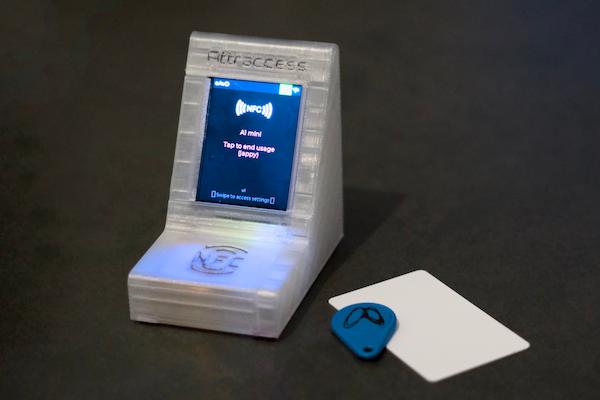
    An Attractap reader beside an NFC key fob and an NFC card
    An Attractap with an NFC card and key fob
    Permissions

    Training status decides who may start what

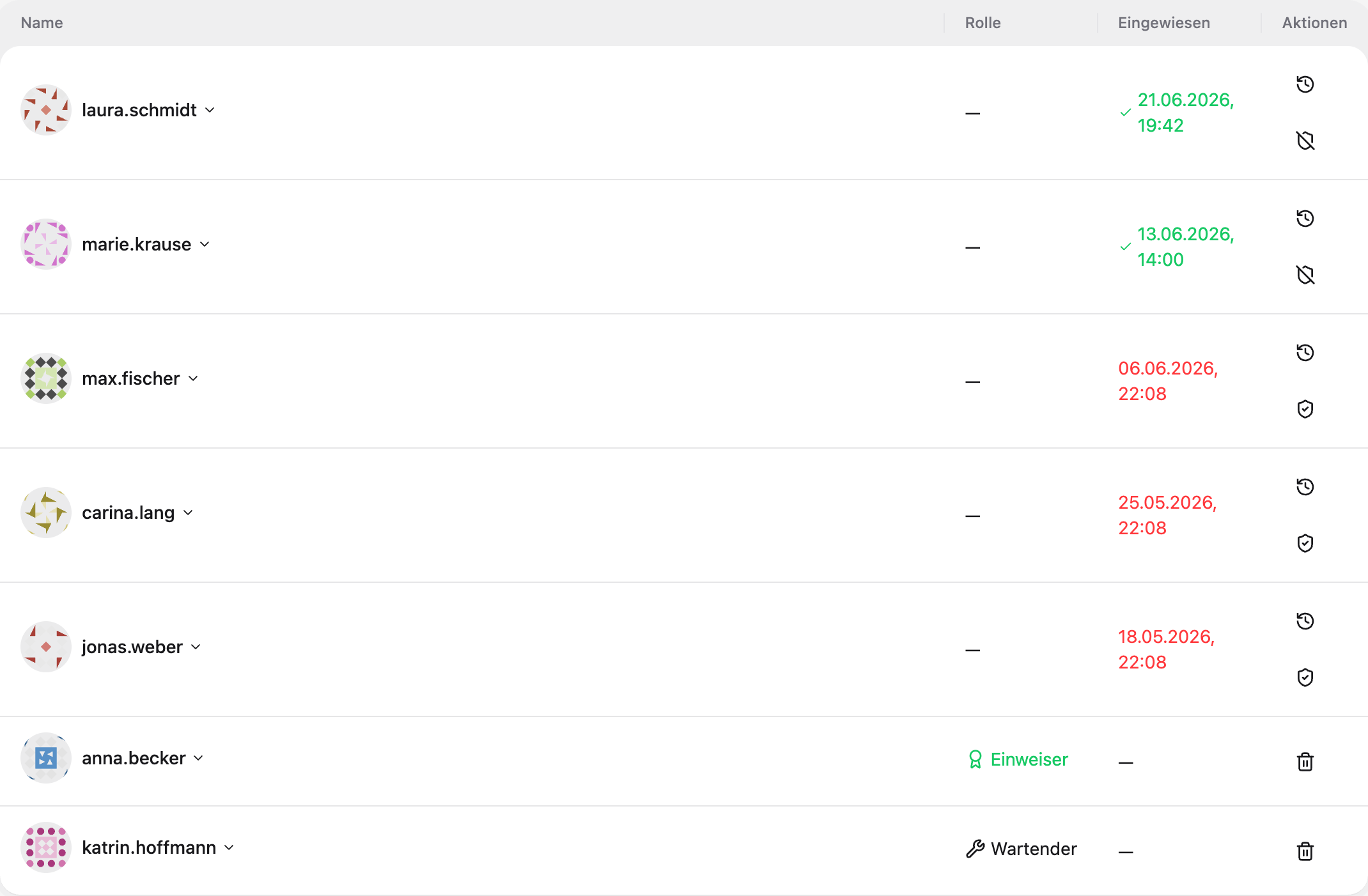
    Access is granted per resource, not per building. Every member is either introduced (may use it), an introducer (may sign others off), or has no access at all. It is one table, with the date of the briefing next to each name.

    • Two clear levels

      "Introduced" may use the machine, "introducer" may authorise others. Nothing in between to misconfigure.

    • The briefing is on record

      Each grant stores who was trained, by whom, and when — ready for an audit.

    • Training that expires

      Set a validity period and access is withdrawn when a refresher is due.

    • Works in bulk

      Group resources and grant access to a whole group in one step.

    A new member joins on Saturday, gets briefed on the 3D printers, and is printing ten minutes later — without an admin touching a keyring.

    Attraccess dashboard: training status and roles per member
    Training status and roles per member
    Automation

    Wire your workshop together, without code

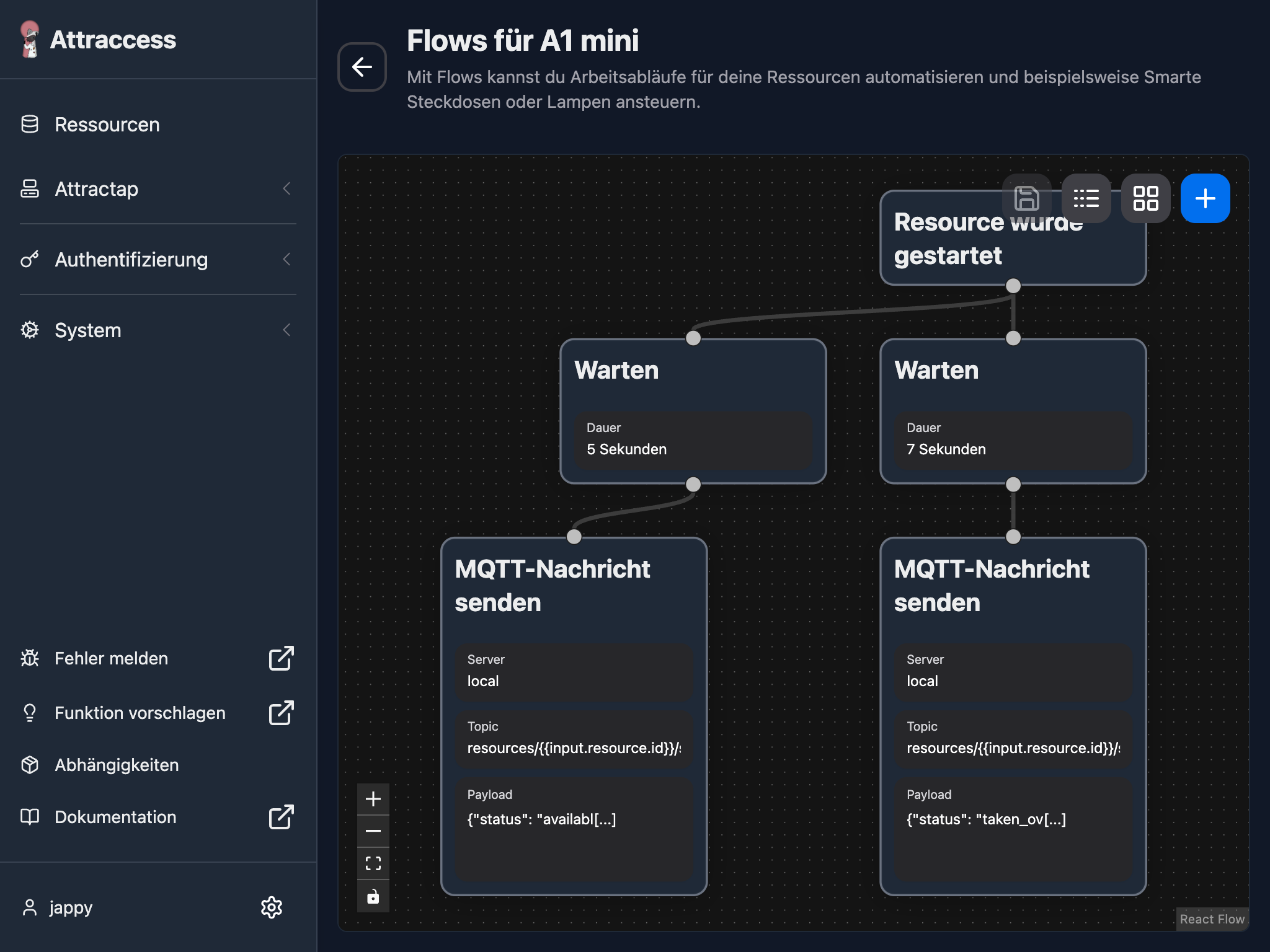
    Flows react to what happens on a resource: session started, session ended, maintenance due, access denied. Drag nodes onto the canvas, connect them, and the chain runs every time the trigger fires.

    • Triggers that matter

      Start, stop, timeout, denied access and maintenance events all start a flow.

    • Actions built in

      MQTT publish, HTTP webhook, e-mail and push notification, out of the box.

    • Timing included

      Wait nodes keep the extraction running for five more minutes after the saw stops.

    • Templated payloads

      Reference the resource and the user inside topics and message bodies.

    Laser cutter starts, the extraction fan switches on over MQTT. Session ends, the fan runs another five minutes, then shuts down.

    The Attraccess flow editor with a trigger, wait and MQTT node
    The flow editor with an MQTT automation
    Usage data

    Every session logged, without anyone writing it down

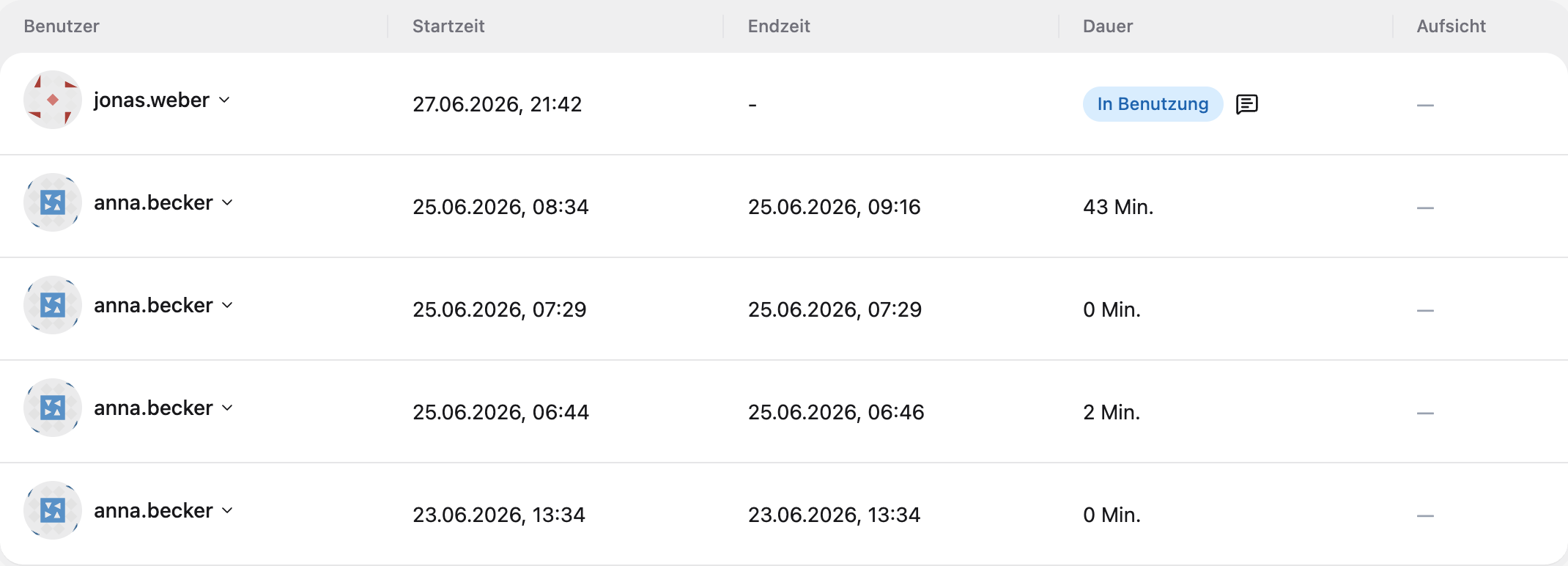
    Attraccess records who used which resource, when it started, when it ended, and how long it ran. The history filters by resource or by member and exports to CSV whenever you need it.

    • Automatic

      The tap starts the log. Nobody has to remember to sign in or out.

    • Per resource and per member

      Answer "who was on the CNC last Tuesday" in two clicks.

    • CSV export

      Hand the numbers to accounting, a grant report, or your own spreadsheet.

    • Live view

      See which machines are running right now, and for how long.

    A quarterly utilisation report built from real sessions instead of estimates.

    Attraccess dashboard: usage sessions with start time, end time and duration
    Usage history for a single resource
    Maintenance

    Machines take themselves out of service

    Set an interval in uses or hours per resource. When a machine reaches it, Attraccess locks it, tells your technicians, and keeps it locked until someone signs the maintenance off.

    • Usage-based intervals

      Count actual runtime or sessions instead of guessing from the calendar.

    • Automatic lockout

      The next tap is refused, with the reason shown on the reader.

    • Technicians notified

      Whoever is responsible hears about it the moment a machine goes down.

    • Signed off in the log

      Completed maintenance stays in the resource history.

    The filament dryer locks after 200 hours and reopens once someone confirms the desiccant was changed.

    Illustration of maintenance scheduling and scaling
    Maintenance and lifecycle rules per resource
    Billing

    Charge per use or per minute, from the same session data

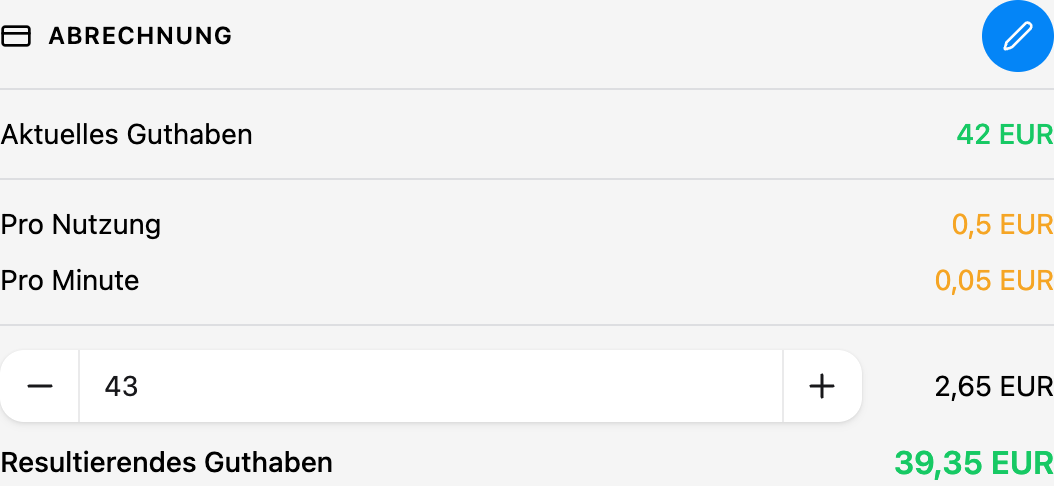
    Every session is already measured, so billing is a matter of setting a rate. Members carry a credit balance, the cost is deducted when the session ends, and the balance is visible to them and to you.

    • Two rate types

      A flat fee per use, a rate per minute, or both at once.

    • Prepaid credit

      Top up a member's balance; sessions draw it down automatically.

    • Transparent for members

      Members see their balance and what each session cost them.

    • Per resource

      Different machines can carry completely different rates.

    The resin printer bills €0.50 per start plus €0.05 per minute — no envelope of cash next to the machine.

    Attraccess dashboard: rates per use and per minute with a credit balance
    Rates and credit balance for a resource
    Self-hosted

    Runs on your server, under your rules

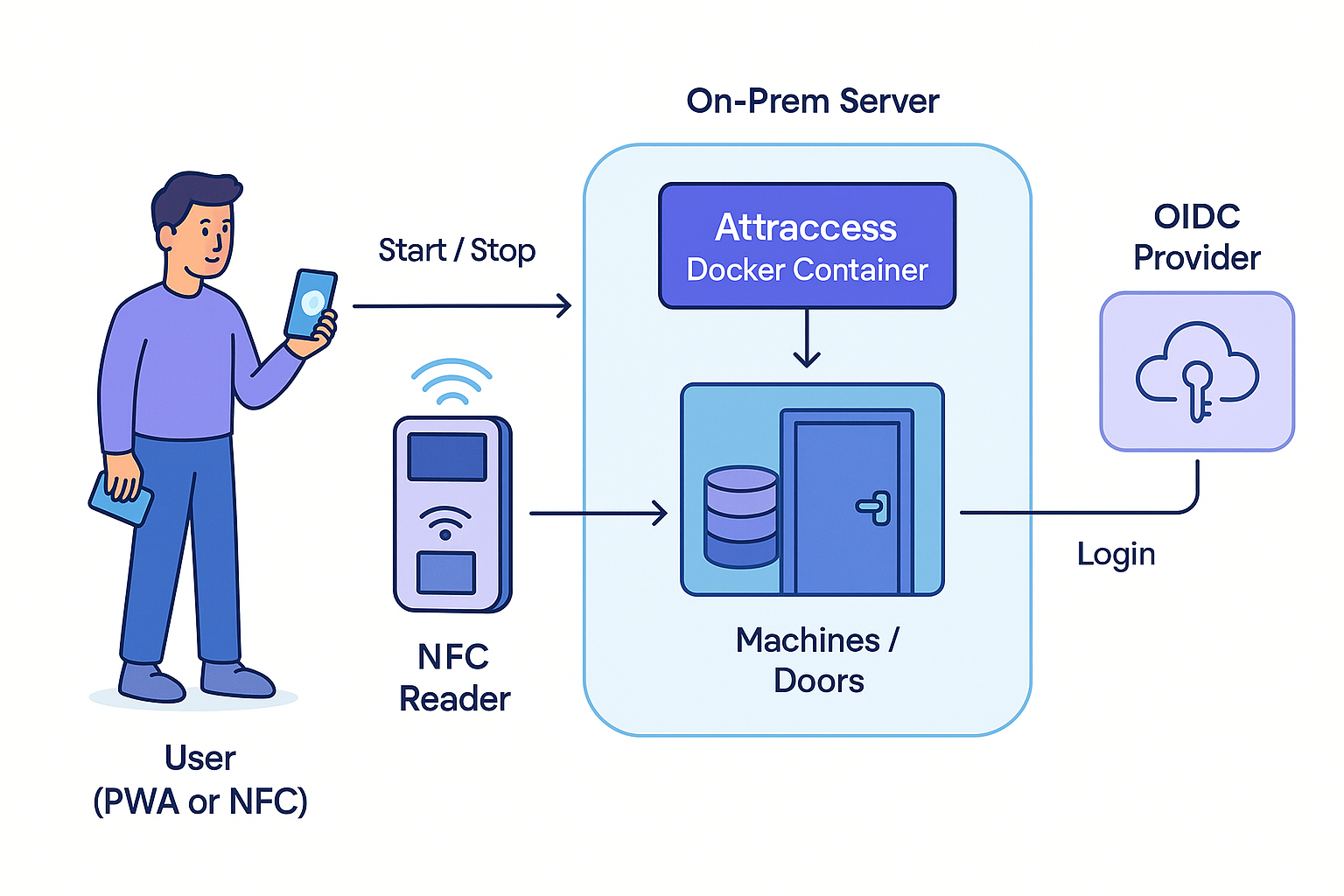
    Attraccess is a Docker container you run on your own hardware or your own cloud. Member data, card IDs and usage history never leave your infrastructure, and it plugs into the identity provider you already use.

    • One container

      docker compose up, on anything from a Raspberry Pi to a rack server.

    • OIDC single sign-on

      Keycloak, Authentik, Entra ID — whatever your organisation already runs.

    • GDPR by construction

      Personal data stays on premises, which makes the data-processing conversation short.

    • Source available

      Prosperity Public License 3.0: free for non-profits, commercial licence for everyone else.

    A university lab that cannot send student data to a SaaS vendor runs Attraccess on its own VM.

    Diagram: user, NFC reader, on-premise server and OIDC provider
    How Attraccess fits into your network

    And the things you only notice when they are missing

    Smaller capabilities that come with every plan.

    • Single sign-on

      Connect any OIDC provider so members log in with the account they already have.

    • Works on any phone

      The browser app installs like a native one — no app store, no rollout.

    • QR code access

      Print a code for machines where a reader would be overkill.

    • MQTT & webhooks

      Talk to the automation stack you already run.

    • Notifications

      E-mail and push when a machine locks, a session runs long, or maintenance is due.

    • CSV export

      Every table exports, so your reporting never depends on us.

    • Groups & areas

      Organise resources by room, department or site.

    • German & English

      The whole interface, including the screens on the readers.

    • Audit trail

      Who changed which permission, and when.

    Questions people ask before they book a demo

    See it running on your own machines

    A 30-minute call, your machines on screen, and an honest answer about whether Attraccess fits.